aria-landmark-auditor: catching landmark and heading problems before screen reader users do
TL;DR: Catch the page-structure mistakes that strand screen reader users, automatically and before release: a Python CLI that audits built HTML for landmark and heading problems, with JSON and Markdown reports and CI-friendly exit codes.
- accessibility
- a11y
- aria
- landmarks
- wcag
- html
- python
- cli
- ci
- open-source
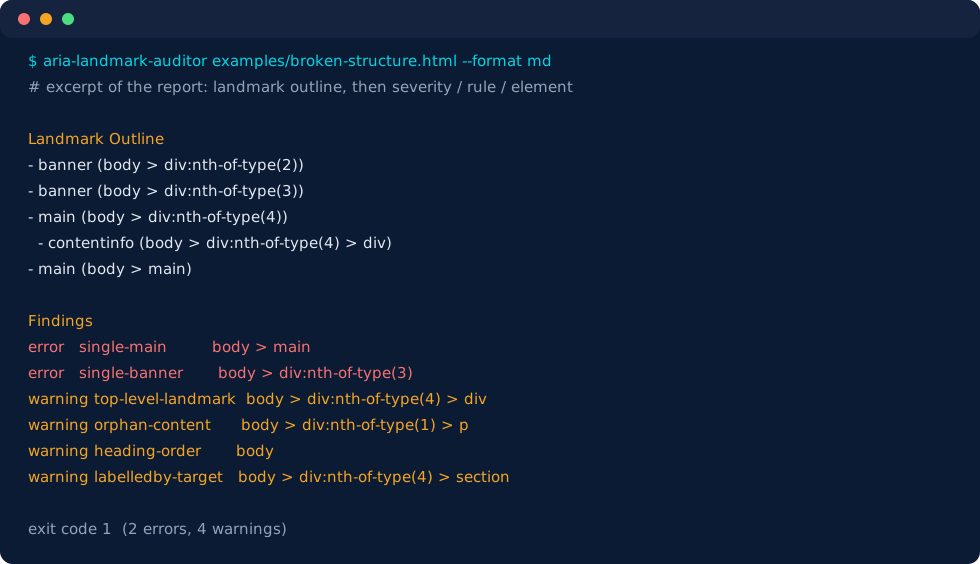
Release #1 in our open-source series. aria-landmark-auditor is a free tool that checks whether a website's pages are built so people using screen readers can find their way around them, and can stop a release when they are not.
Why it matters
People who are blind or have low vision often use a screen reader, software that reads a page aloud. Rather than listening from top to bottom, they jump between a page's main areas and its headings, much like using a table of contents. Those main areas are called landmarks: the header (banner), the navigation menus (navigation), the main content (main), and the footer (contentinfo).
When a page has no marked main area, two menus that cannot be told apart, or headings that skip from a section straight to a sub-sub-section (h2 to h4), that navigation breaks. Sighted users do not notice, and neither does a normal build or unit test, so these problems reach customers. On sites built from templates, one mistake repeats on hundreds of pages.
What it does
- Checks the finished pages of a site against eight structural rules, such as "there is exactly one main content area" and "when a page has more than one menu, each has a name that tells them apart."
- Points to the exact element that needs fixing, in a report people can read (Markdown) and other tools can process (JSON).
- Can block a release. It runs in CI (continuous integration: the automated checks that run on every change) and returns a pass or fail result, so a broken page is stopped the same way a failing test is.
- Leaves the judgement calls to people. It does not certify that a site meets WCAG (the Web Content Accessibility Guidelines), and it does not replace testing with real screen readers. It catches the mechanical mistakes cheaply, so human testing time goes to the problems that need it.
Who it's for
- Front-end engineers who want structural accessibility checks in a pull request, not an audit six months later.
- Design-system and docs teams who ship hundreds of static pages from templates, where one template mistake repeats everywhere.
- QA and accessibility leads who need a repeatable first pass before manual screen reader testing.
What it checks
Eight rules, each with a configurable severity:
| Rule | What it flags |
|---|---|
single-main |
No main landmark, or more than one |
single-banner / single-contentinfo |
More than one top-level banner or footer landmark |
top-level-landmark |
banner, main, or contentinfo nested inside another landmark |
unique-label |
Repeated landmarks of the same role with no accessible name to tell them apart |
orphan-content |
Visible text outside every landmark (skip links are exempt) |
heading-order |
No h1, or skipped heading levels such as h2 to h4 |
labelledby-target |
aria-labelledby pointing at an id that does not exist |
Architecture and tech stack
| Technology | Role | Why this choice |
|---|---|---|
| Python 3.11+ | Language and CLI (argparse) |
Zero-friction install on any CI runner; the CLI needs no framework |
| html5lib (via BeautifulSoup 4) | HTML parsing | Repairs malformed markup the way browsers do, so the landmark tree matches what a browser exposes rather than what a lenient parser guesses |
| PyYAML | Config file | Per-rule severities and path ignores in a format teams already use |
| pytest | Tests | 45 tests covering rules, names, config, reports, and the CLI |
| ruff | Lint and format | One fast tool for both |
| Docker + Compose | Optional runner | docker compose up shows output without installing Python dependencies |
Key design decisions and trade-offs
Optimized for: trustworthy findings on real, built HTML; stable selectors in reports; a machine-readable contract (JSON, documented exit codes).
Intentionally cut for the one-week sprint:
- No JavaScript execution and no crawling. Pages rendered client-side need a pre-render step (for example a Playwright snapshot) first. This keeps the tool deterministic and fast.
- No source line numbers. html5lib's tree builder does not record positions, so findings use selector paths like
body > footer > navinstead. - Accessible names are a landmark-focused subset of the full accessible-name algorithm.
- No WCAG conformance claim. The report footer says so on every run.
Exit codes are part of the design: 0 when nothing at or above --fail-on is found, 1 when something is, and 2 when an input could not be read, while readable files are still reported.
Under the hood
Landmarks are mapped from explicit role attributes and from HTML's implicit roles. The subtle part is scope: a <header> is a banner only when it is not inside article, aside, main, nav, or section.
# Elements that scope <header>/<footer> so they stop being banner/contentinfo.
SECTIONING_SCOPE = {"article", "aside", "main", "nav", "section"}
# Roles that are only exposed as landmarks when they have an accessible name.
NAME_REQUIRED_ROLES = {"form", "region"}
The rules then run over the extracted tree, not over raw markup. The singleton check, for example, only looks at top-level landmarks, so a banner nested in another landmark is reported once by top-level-landmark instead of twice:
for role, rule in SINGLETON_ROLES.items():
    top = [lm for lm in structure.landmarks if lm.role == role]
    for extra in top[1:]:
        findings.append(
            RawFinding(
                rule,
                f"Page has {len(top)} top-level {role} landmarks; expected at most one.",
                extra.selector,
            )
        )
Sharp edges and benchmarks
A tricky one: identical siblings. Reports point at elements with paths such as body > div > nav:nth-of-type(2). The obvious way to compute the position is siblings.index(node). In BeautifulSoup, Tag.__eq__ compares structure, so two identical <nav>c</nav> siblings are equal and .index() returns 0 for both. Two different elements would get the same selector. The code finds the element by identity instead:
same = parent.find_all(node.name, recursive=False)
if len(same) > 1:
    # Tag.__eq__ is structural, so locate the element by identity.
    position = next(i for i, sibling in enumerate(same) if sibling is node)
    part += f":nth-of-type({position + 1})"
Measured numbers. Synthetic pages with a fixed number of labeled sections, each with a heading, a paragraph, and a labeled nav. Median of 7 runs on an AMD Ryzen 7 PRO 8700GE, Python 3.12.3:
| Sections | HTML size | Parse only | Full audit |
|---|---|---|---|
| 10 | 1.1 KiB | 1.0 ms | 1.7 ms |
| 100 | 10.5 KiB | 8.6 ms | 15.8 ms |
| 1,000 | 108.1 KiB | 78.3 ms | 313.4 ms |
Process peak memory for the whole benchmark run was about 51 MiB; the CLI on a small fixture used about 28 MB and ran in 0.10 s.
An honest finding from those numbers: a 10x larger page took about 20x longer. Profiling attributes roughly 95% of the 1,000-section time to selector construction, which re-scans a parent's children for every element. It is invisible on normal pages and is tracked in issues.md. We did not fix it during the sprint.
Quick start
git clone https://github.com/jare20895/aria-landmark-auditor
cd aria-landmark-auditor
docker compose up --build
That audits the bundled examples/duplicate-nav.html and prints a JSON report with two unique-label warnings. Without Docker:
pip install .
aria-landmark-auditor "site/_build/**/*.html" --format md --fail-on warning
Path to production
- CI integration: emit SARIF so findings show up as code-scanning annotations, and publish a ready-made workflow step.
- Scale and fidelity: cache sibling positions to remove the quadratic selector cost, and add an optional parser mode that records source line numbers.
- Coverage for modern sites: document a Playwright pre-render hook for client-rendered apps and add a site-level summary (most common findings, pages with no
main).
Limits, plainly
This is static analysis of local HTML files. It does not execute JavaScript, crawl URLs, or claim WCAG conformance, and it is not a substitute for manual screen reader testing.
The code is MIT licensed: github.com/jare20895/aria-landmark-auditor.